
Montgomery County Court Calendars Explained
District cases in Montgomery County appear on the Fourteenth Judicial District calendar. It is the official local schedule. You can view it by month or as a list, filter by category, and search by word. Be careful, though. One event may be a docket call covering many cases, not a single appointment. Some event pages also link a docket PDF with case-level rows.
Two other sources matter. Kansas CaseSearch lists events on a public case. The filed hearing notice is the paper trail that started the setting. Each may update on its own schedule. The clerk FAQ adds a caution. Special judge settings may not show on the general calendar.
The official calendar page is the source for this assigned image.
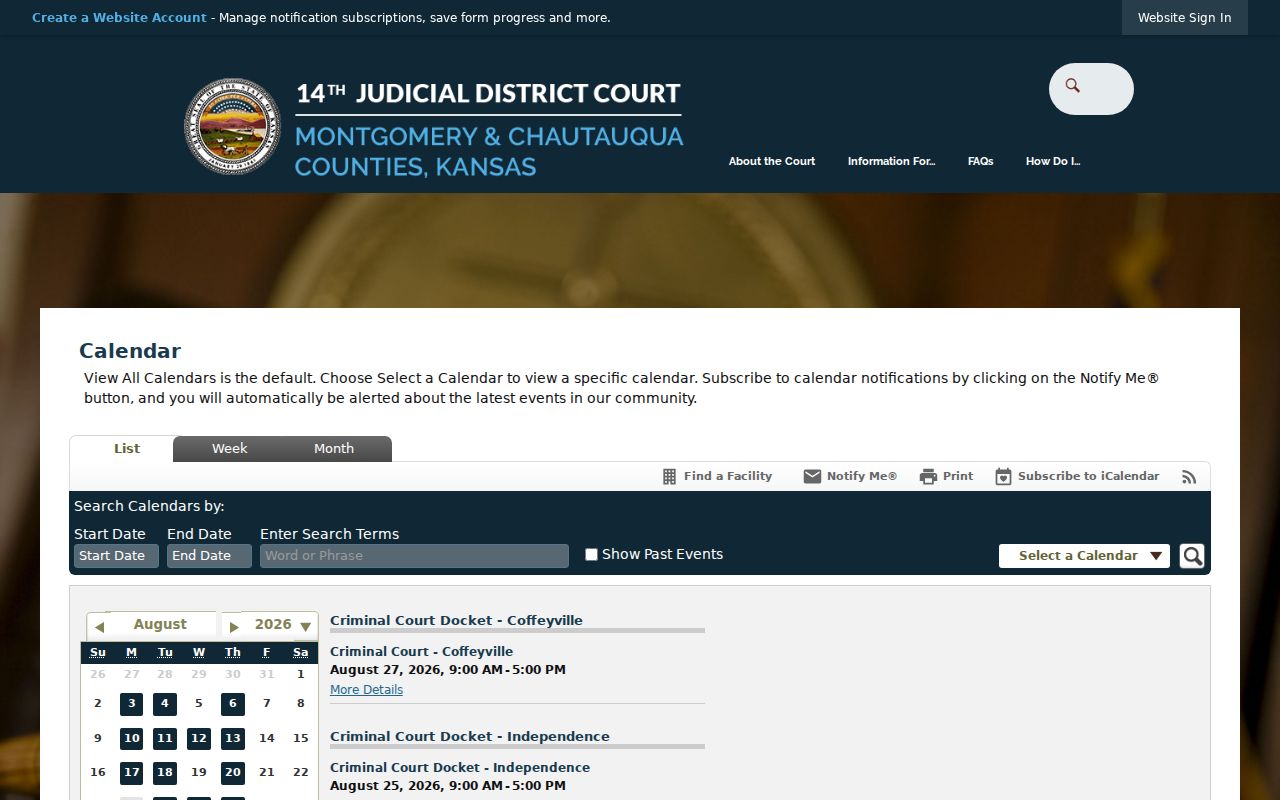
Choose a Montgomery Court Calendar
The local system splits its feeds by type: criminal, domestic and civil, traffic, probate, limited-action, small-claims, hearing, holiday, and others. Pick the right category before searching. A civil party name will not necessarily surface in a broad criminal event list, and probate settings can run on a different feed than a regular civil docket.
| Calendar | Use it for | Check next |
|---|---|---|
| Criminal | Arraignment, pretrial, plea, trial, sentencing | Criminal events index |
| Domestic/Civil | Motions, reviews, trials, protection hearings | Civil case entry and notice |
| Traffic | District traffic settings | Citation and clerk confirmation |
| Probate/Limited/Small Claims | Special civil dockets | Correct case-type record |
| Holidays | Court closure information | Current alert or clerk office |
A municipal court date lives on the city court's own schedule. Being inside Montgomery County does not move it onto the district calendar.
Finding Your Court Date
Begin with what you hold: a case number, a citation, or the filed notice. The local calendar works best when you know the court and the category. Kansas CaseSearch is the stronger tool for a district case number. It also works well with a party name. Clerk staff can confirm a recent filing or the next hearing in an unsealed case. They cannot offer legal advice, though.
- Identify district court or municipal court.
- Open the matching live calendar and choose a category.
- Search the date range or event text.
- Check Kansas CaseSearch for the case events index.
- Read the filed notice or docket PDF.
- Call or visit the originating clerk if the sources conflict.
For district records, public terminals at the Independence and Coffeyville clerk offices can display open material that is not available remotely. A written records request works too, but it is slow for a hearing that is days away. The court publishes no daily printed calendar, so do not count on one.
Search Montgomery Calendar Controls
The list view takes a start date, an end date, search terms, an option to show past events, and a calendar selection. Start with a tight date range. A broad word like “court” can pull up more event shells than a docket category or case-related term would. Past events help you trace where a date once appeared, but they do not prove the current status of a case.
| Start date | The first day included in the list |
|---|---|
| End date | The last day included in the list |
| Search terms | Words matched against visible event text |
| Show past events | Adds older calendar entries for context |
| Calendar | Narrows criminal, traffic, domestic, or another feed |
This search is not CaseSearch. It finds schedule events, not party names. When an event shell lacks the detail needed to confirm a match, switch to the case lookup.
How to Read a Court Setting
A setting is a purpose, not a result. Read the date and time alongside the location, the judge, the category, and the type of setting. One docket call can stretch across a block of hours. Your case comes up somewhere inside it. Never guess your arrival time from another case on the list.
| Date | The scheduled calendar day shown by the current source |
|---|---|
| Time | A docket-call range or an individual start time |
| Location | Independence, Coffeyville, courtroom, or approved remote notation |
| Judge | The judicial officer listed for the event |
| Setting type | Arraignment, review, motion, pretrial, trial, sentencing, or another purpose |
Older Montgomery docket samples show “via Zoom” on a specific setting. That label does not make later hearings remote. Follow the current notice and the court's instructions for access.
Montgomery Criminal Calendar Patterns
Criminal events in Independence recur on Tuesdays, and Coffeyville criminal events recur on Thursdays. Those rhythms can guide which calendar feed to open, but they are habits, not rules. Holidays, transfers, judge schedules, special settings, and court orders can all push an event to a different slot.
A Montgomery case may sit at either Independence or Coffeyville. Both belong to the same Kansas District Court. Local case IDs use MGI and MGC to mark those locations. The code helps you choose an office and an event list. It cannot promise where every later hearing will be held.
Pattern, not promise: An observed weekday pattern is a search clue. The current case notice and court confirmation control the actual Montgomery County court date.
Subscribe to Montgomery Court Dates
The Fourteenth District iCalendar page publishes feeds for each local calendar category. A feed pushes public event updates into compatible calendar software. Subscribe only to the categories that fit your case. Otherwise a needed setting can get buried under unrelated events.
The official feed page is the source for this assigned image.
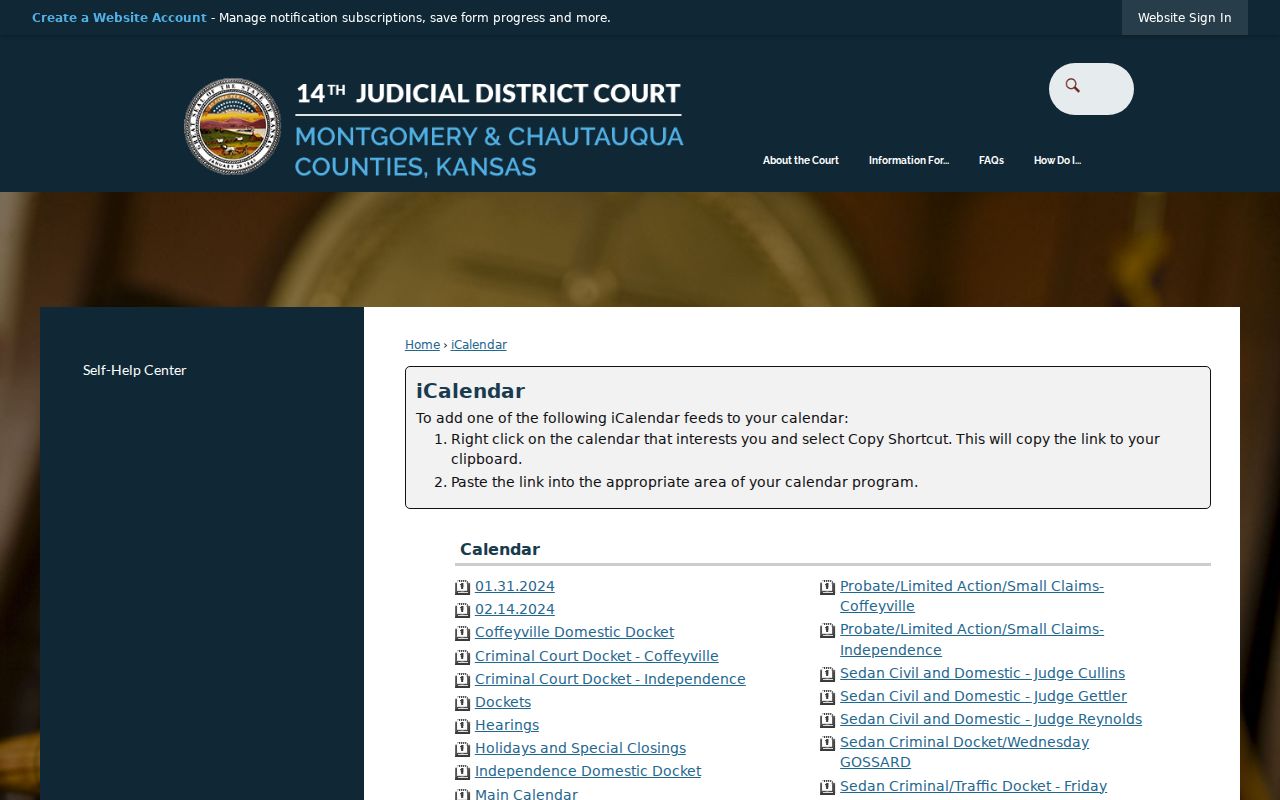
A feed is a convenience, not service of notice. Software can sync late, an old event can stay cached, and the court may post a change after your last refresh. Before you rely on a saved entry, reopen the live court event.
Continuances, Resets, and Cancellations
Three words dominate docket changes. A continuance moves a case to a later date with the court's approval. A reset is simply the new setting, or the act of rescheduling itself. And a cancellation means the posted event will not go forward. That last one trips people up. A cancelled hearing does not end the case. Watch for a fresh docket entry or notice explaining what happens next.
Expect last-minute shifts. Montgomery County docket samples caution that sudden changes may never reach the posted calendar. If an event vanishes, pull up the case events rather than assuming a dismissal. Check the current calendar category. Read the latest filed notice. Then call the clerk or your attorney. City cases belong to that municipal court, not the district. Two alert tools exist, and they do different jobs. Notify Me covers events or feeds you choose. The Alert Center handles broader items like closures. Neither one substitutes for an order entered in the case record. A proper reset should yield a new date or direction from the court. Keep the case number at hand when you call for confirmation.
Confirm Montgomery County Court Dates
Pick up the phone before you drive. The District Court Clerk keeps two Montgomery offices, and staff can route you or confirm a hearing. The local FAQ draws one line, though. Record-search requests are not accepted by phone. For a plain date check, give the full case number and say whether the case sits at Independence or Coffeyville. Staff may also help with a recent unsealed filing or the next hearing.
Independence District Clerk
300 E Main Street, Suite 201
Independence, KS 67301
620-330-1070
Monday through Friday, 8 a.m. to noon and 1 to 4 p.m.
Coffeyville District Clerk
102 W 7th Street, Suite A
Coffeyville, KS 67337
620-251-1060
Monday through Friday, 8 a.m. to noon and 1 to 4 p.m.
Prefer to look yourself? Public terminals at the district clerk offices show open case information. When you need the underlying record itself, send a written request through the local web form. Mail, fax, and in-person delivery also work. The clerk offers no dedicated records email or drop box.
If You Miss a Court Setting
Act fast if you miss a setting. Call the originating court and an attorney right away. Give them the case number, court location, scheduled date, and setting type. Ask what the docket shows now. Also ask whether the judge issued an order, warrant, default, bond action, or new date. Clerk staff can describe the public record. They cannot tell you how to resolve the missed appearance.
Act promptly. A missed criminal or traffic setting can lead to a failure-to-appear response, warrant, or bond consequence. A missed civil setting can lead to default or other adverse action.
Do not appear at a different location or date based on a guess. Confirm instructions with the court and seek licensed legal advice about the missed setting.
Know which court to call. Municipal citations go to the city court printed on the ticket. Montgomery district cases go to the Independence or Coffeyville clerk. If the online calendar shows nothing, the filed notice and the case events still matter.
Verify Montgomery Court Date Sources
Each source does one job. The calendar gives the public schedule, CaseSearch indexes the events, a docket PDF lists the case rows set for a court day, and the filed notice carries the instruction issued in the case. A month view can be current but thin. A PDF can be detailed but stale.
| Source | Best use | Limit |
|---|---|---|
| Live local calendar | Find public event shells | Special settings may be absent |
| CaseSearch | Read public case events | Restricted cases may not show |
| Docket PDF | See scheduled case rows | Late changes may be missing |
| Filed notice | Read case-specific direction | A later order can change it |
| Clerk or attorney | Confirm an urgent setting | Clerk cannot give legal advice |
Work the sources in order. Calendar first, CaseSearch second, the notice third, and court confirmation whenever the sources conflict. That routine keeps a Montgomery County court date tied to the current court record instead of an old copy.